

Wallet system
Prepay for labels, top up automatically and see every charge and refund.
Domestic shipping
Check the address, compare rates, then buy and print the label.
International shipping
Customs details sent with the label, with presets for products you ship often.
Tracking and refunds
Tracking saved on each invoice, and refunds for labels you don't use.
Pay for labels from a prepaid shipping wallet
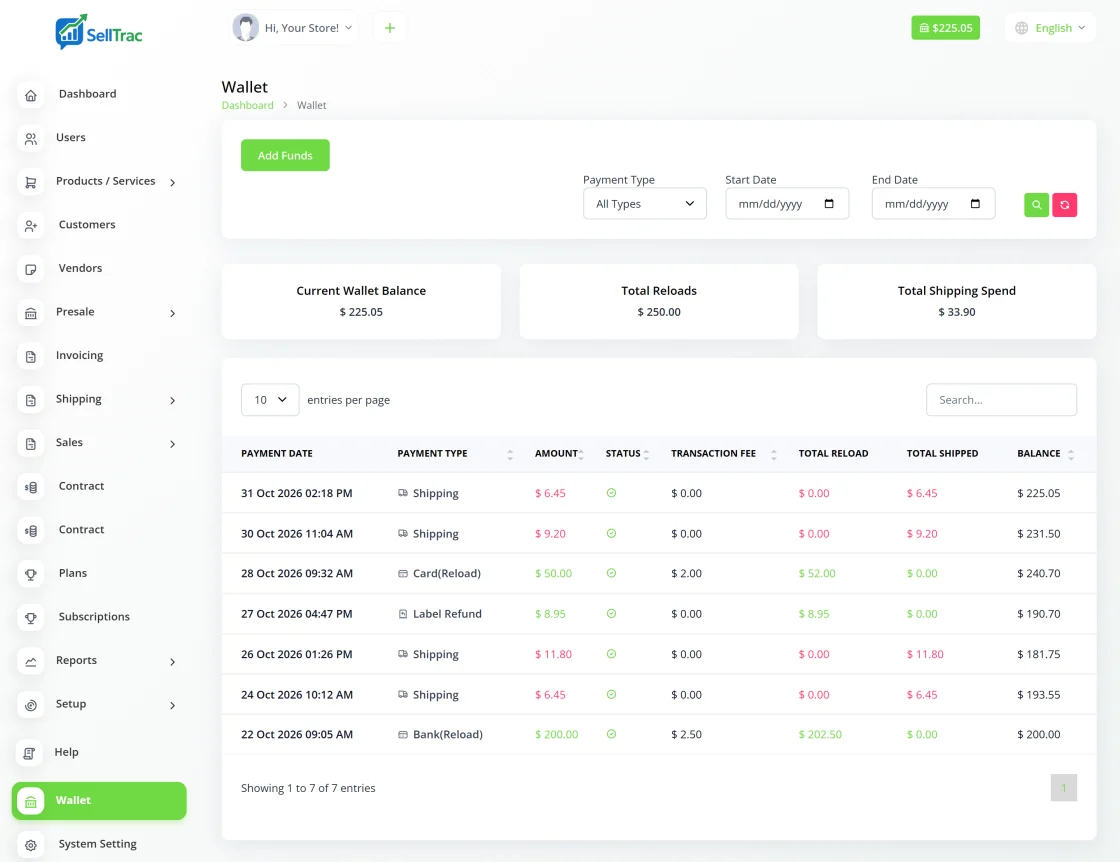
Shipping labels are paid only from your SellTrac wallet. Add funds by bank transfer from your saved bank account, or by card, whenever you like, or turn on auto-reload so the wallet tops itself up when the balance falls below an amount you choose.
Your wallet shows the current balance and a full list of transactions: money added, labels paid for and refunds credited back. A processing fee may apply when you add funds.
- Add funds by bank transfer or with a credit or debit card
- Auto-reload: choose a minimum balance and how much to add
- The label price is deducted from your balance when you buy it
- Transaction history of deposits, label payments and refunds
- Refunds for unused labels credited back once the carrier approves them
Ship within the country in a few clicks
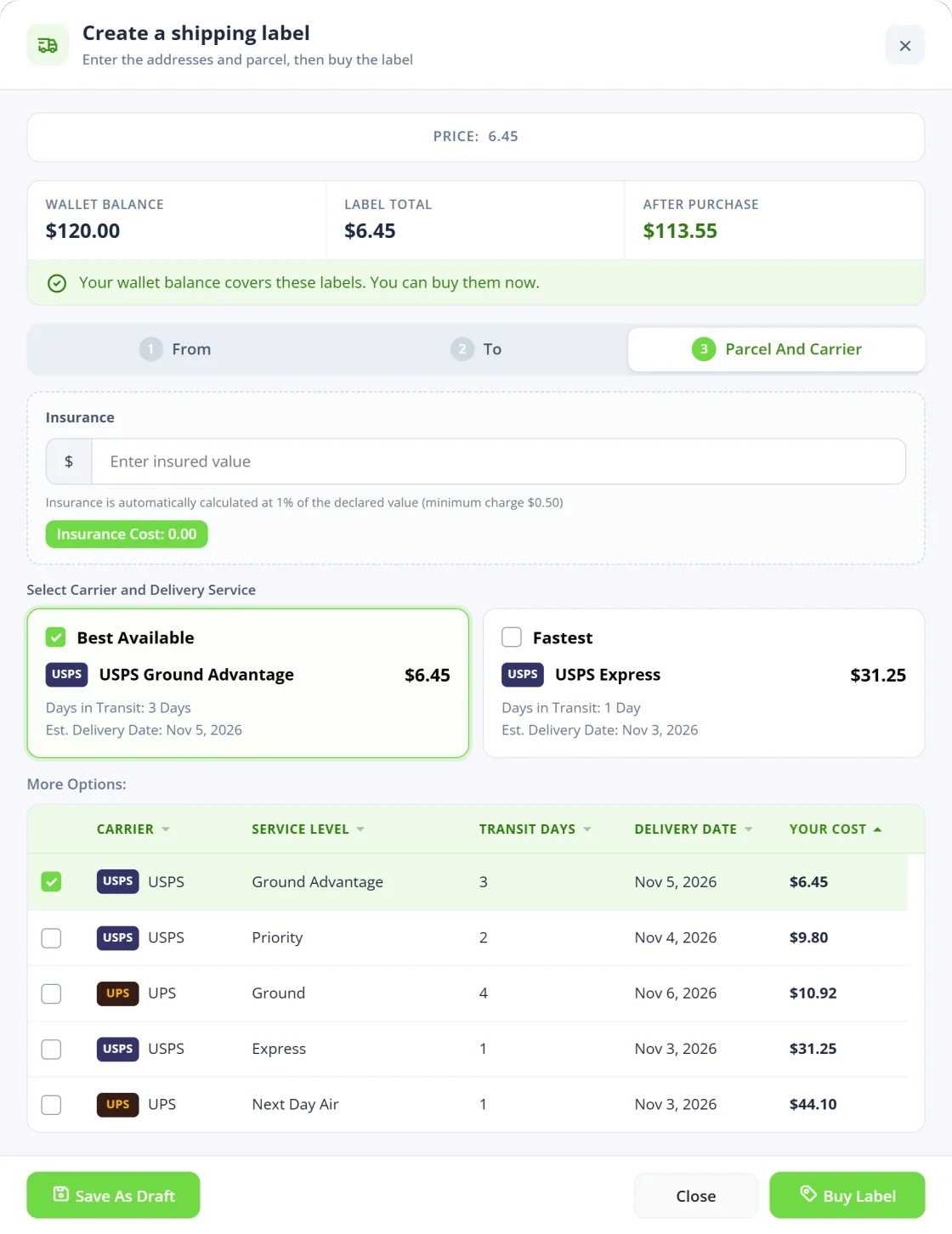
Create a shipment from a paid invoice, or make a single label for a package that has no invoice. SellTrac checks the delivery address, shows rates for the services available, such as USPS and UPS, and you buy the one that suits the parcel.
Print one label or a whole batch together. The tracking number is saved on the invoice and tracking updates arrive by themselves.
- Labels from paid invoices, one at a time or in bulk
- Single labels for packages without an invoice
- Address check before you buy
- Rates compared side by side, with the price shown before you pay
- Optional shipping insurance for valuable parcels
International labels with customs details built in
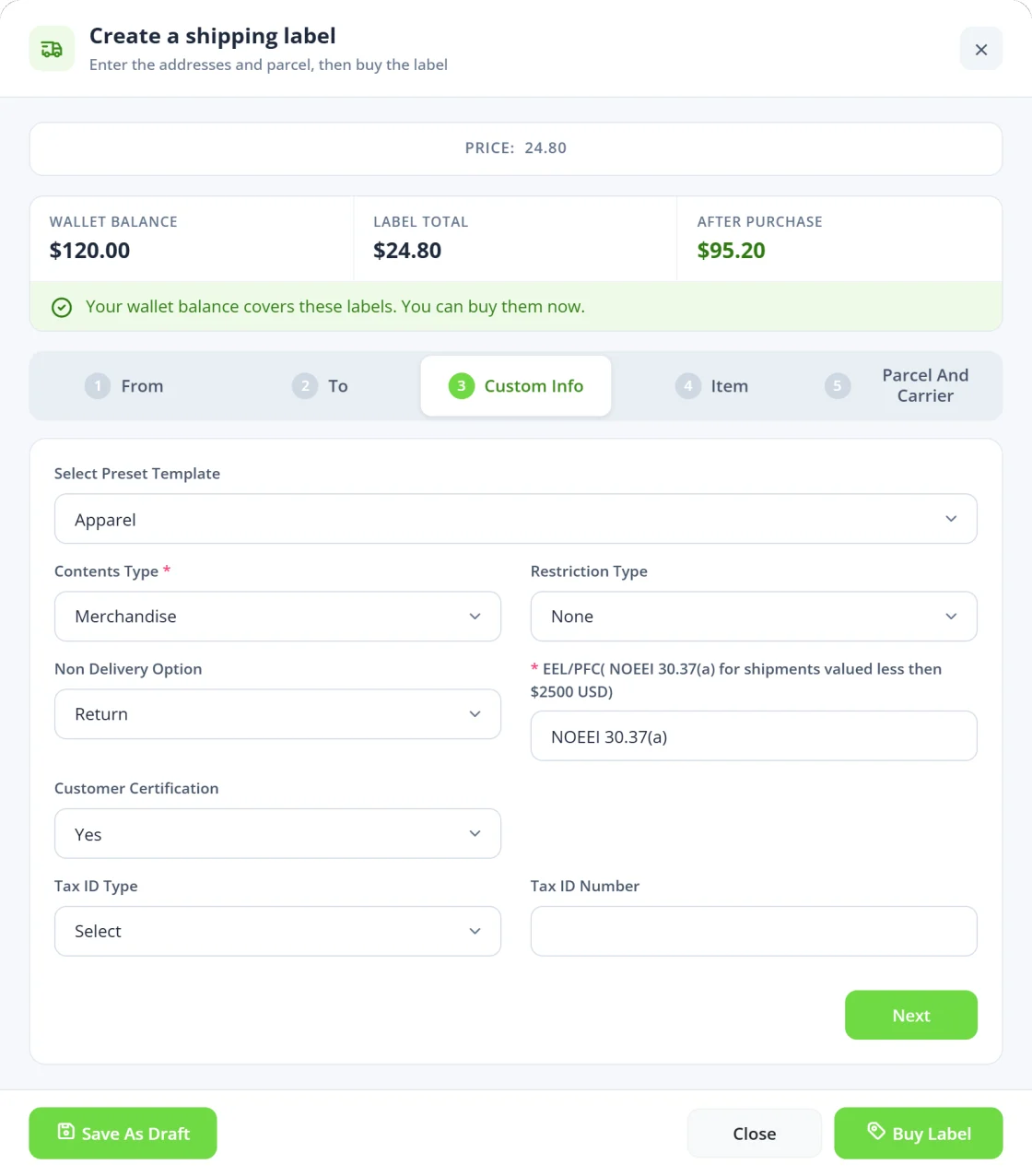
Parcels going abroad need a customs declaration. Enter the contents type, description, HS tariff number, country of origin, quantity, value and weight, the EEL or PFC code and what should happen if the parcel can't be delivered. SellTrac sends these details with the label request.
Save the details as presets for the products you ship most, then pick a preset instead of typing them again. International orders have their own rate comparison, bulk labels and shipped list.
- Customs declaration with HS tariff number, origin, value and weight
- Contents type, restrictions and a non-delivery option
- Reusable customs presets
- Rate comparison and bulk labels for international orders
- International shipments listed separately
Every shipment and refund in one place
Shipped domestic and international orders each have their own list, and every label's tracking number sits on its invoice next to the order and the payment.
If you get interrupted, save the batch as a draft and finish it later. For a label you don't use, request a refund from SellTrac. Approval and timing depend on the carrier.
- Shipped domestic and international invoices in separate lists
- Automatic tracking updates from the carrier network
- Add the tracking number of a label bought somewhere else
- Save a half-finished batch as a draft
- Label refund requests and a shipping report
The shipping workflow, start to finish
The same steps for one parcel or a hundred.
-
Fund your wallet
Add funds from your bank account or card, or turn on auto-reload.
-
Pick the orders
Choose paid invoices, or start a single label without an invoice.
-
Compare rates
Check the address and choose the carrier and service for each parcel.
-
Add customs details
For international parcels, fill in the customs declaration or pick a saved preset.
-
Buy and print
The cost is deducted from your wallet and the labels are ready to print.
-
Track and manage
Follow tracking updates, insure valuable parcels and request refunds for unused labels.
Frequently asked questions
Straight answers about how this works in SellTrac.
How do I pay for shipping labels?
Can the wallet top itself up?
What happens if I don't use a label?
Can I ship internationally?
Which carriers can I use?
Can I see where my money went?
Everything SellTrac does, in order
Collect the order, invoice it, take it from stock, get paid, then ship it. Each feature picks up where the last one ended.
- 1 Social Media Copy & Paste Sell in posts and live sales, copy the customer comments, paste them into SellTrac and get...
- 2 Invoice Generator Generate itemized invoices with taxes, discounts and shipping, email them with a pay-onlin...
- 3 Inventory Management Manage products and services with SKUs, barcodes, prices and variants. Stock updates autom...
- 4 Payment Gateways Connect Stripe, PayPal, Square, Zelle or Venmo and let customers pay invoices online. Paym...
- 5 Shipping Management You are here
- 6 Bulk Label Printing Select many paid invoices, compare carrier rates, buy every label in one step and print th...