

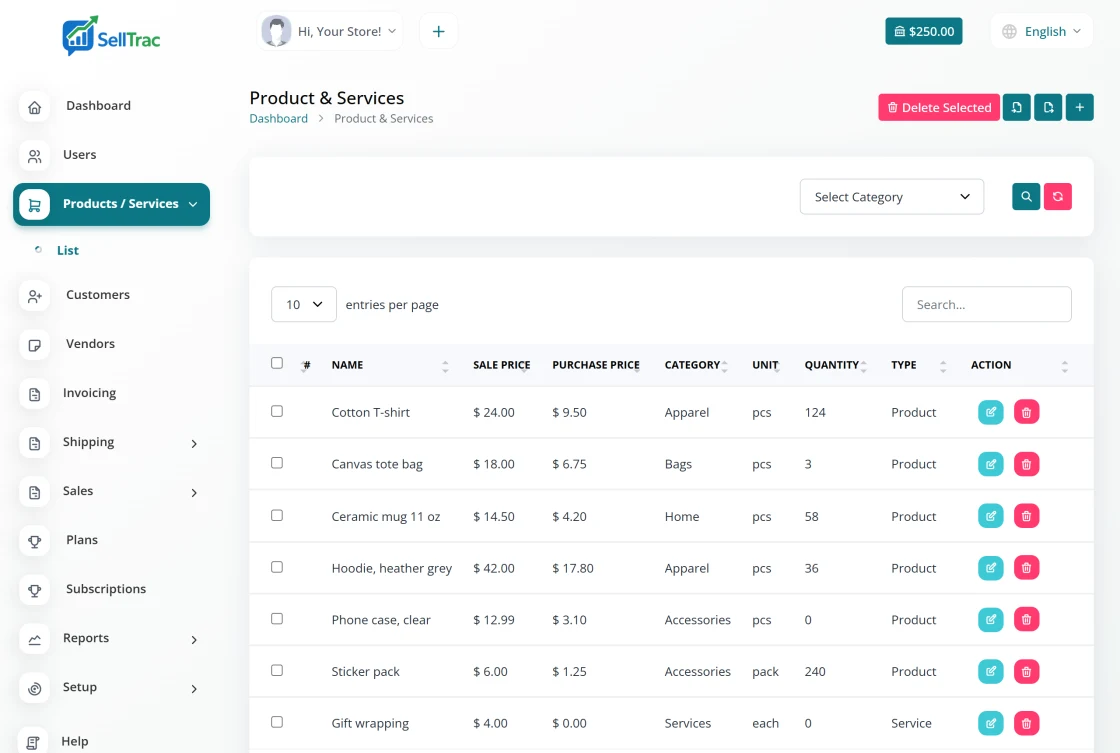
Product catalog
Products and services with SKU, barcode, prices, tax, category and unit.
Automatic stock updates
Invoices take stock out and bills put it back in, with no manual counting.
Low-stock alerts
Set a minimum quantity and see which products are running low on your dashboard.
Stock history
Every change is logged with the invoice, bill or adjustment that caused it.
One catalog for everything you sell
Add each product or service once and use it on every invoice, bill and proposal. Prices, tax and units come along automatically, so line items are filled in for you.
Products that come in different sizes or colors can have variants with their own prices and stock.
- Name, SKU and barcode for every item
- Sale price, purchase price and tax
- Categories and units to keep the catalog organized
- Variants such as size or color, with separate prices and stock
- Products and services in the same list (services have no stock)
Stock that keeps itself up to date
When you invoice a customer, the products on the invoice are taken out of stock. When you record a bill from a supplier, the products come back in. For anything else, such as a recount or damaged goods, add or remove stock by hand.
Give a product a minimum quantity and it appears in the low-stock list on your dashboard when it drops below that number, so you can reorder before you run out.
- Stock reduced automatically from invoices
- Stock increased automatically from bills
- Manual stock adjustments, up or down
- Minimum quantity and a low-stock list on the dashboard
Know why every number changed
Each stock movement is logged with its quantity and the invoice, bill or adjustment behind it. The product stock report shows the full history, so you can trace any difference.
- Stock history for every product
- Product stock report
- Import products from a CSV file
- Export products and stock levels to CSV
How inventory works in SellTrac
Set it up once and it stays current as you sell and restock.
-
Add or import your products
Create products one by one or import them from a CSV file, with SKU, prices, tax, category and unit.
-
Set minimum quantities
Choose the level at which each product should be reordered.
-
Sell with invoices
Products on an invoice are taken out of stock automatically.
-
Restock with bills
Record a supplier bill and the products are added back to stock.
-
Check reports and alerts
Review the stock report and the low-stock list on your dashboard.
Frequently asked questions
Straight answers about how this works in SellTrac.
Does stock update automatically when I sell?
Can I adjust stock by hand?
Can I get a warning when stock runs low?
Can I manage products with sizes or colors?
Can I import my existing product list?
Everything SellTrac does, in order
Collect the order, invoice it, take it from stock, get paid, then ship it. Each feature picks up where the last one ended.
- 1 Social Media Copy & Paste Sell in posts and live sales, copy the customer comments, paste them into SellTrac and get...
- 2 Invoice Generator Generate itemized invoices with taxes, discounts and shipping, email them with a pay-onlin...
- 3 Inventory Management You are here
- 4 Payment Gateways Connect Stripe, PayPal, Square, Zelle or Venmo and let customers pay invoices online. Paym...
- 5 Shipping Management Fund a shipping wallet, compare carrier rates, buy and print domestic and international la...
- 6 Bulk Label Printing Select many paid invoices, compare carrier rates, buy every label in one step and print th...